Corporate catering orders: invoices, PO numbers and one-click reorders
Corporate buyers want an invoice, a PO number and a one-click reorder. Here is what your catering ordering site needs to let them pay by company.

Key takeaways
- Corporate buyers rarely pay with a personal card. They want an invoice with Net-30 terms, a purchase order number on it, and a tax-exempt flag when their company qualifies.
- The same buyer orders the same lunch for the same team again and again. A one-click reorder saves her a phone call and saves you an email trail.
- Treat corporate accounts as a channel of their own. One billing address can hold several buyers, one payment method and the full order history.
Corporate catering orders rarely look like a small pickup from the same website. The buyer is an office manager or an executive assistant ordering lunch for 40 people, with a payment method the company controls, a date three weeks out and a boss who signs off. If your ordering site treats that buyer like a regular customer, the order ends up in email, on the phone and on a sticky note.
This is a short guide on what a corporate catering buyer actually needs, what breaks when a standard online ordering site is used for it, and how to set the account up so the next order takes one click instead of three days.
What makes a corporate catering order different
A corporate catering order has four pieces that a normal pickup order does not have.
It is paid by the company, not by a person. The buyer wants an invoice with Net-30 terms, or a company card held at the finance desk. A personal card at checkout is the exception for this kind of order.
It carries a PO number. The accounts payable team cannot pay the invoice without that number tied to the order. Without a field for it, the number comes in the subject line of a follow-up email and gets lost.
It may be tax-exempt. Hospitals, universities, government offices and some non-profits are tax-exempt in their state. They present a certificate, and the sales tax on the order has to come off.
It is approved before it ships. Someone other than the buyer, the office manager or finance, signs off on the total before the kitchen starts. If the kitchen cooks on the first click, the restaurant eats the loss when the order is cancelled.
An ordering site built for a Friday pizza pickup rarely has all four. The restaurant catches the missing pieces in email, phone calls and screenshots, and the catering manager becomes a human invoicing system.
The handoff that breaks every week
The usual path, with a non-corporate online ordering site, looks like this:
- The office manager fills the cart on the restaurant’s catering page.
- She calls the restaurant because the checkout only accepts a personal card.
- The restaurant sends a quote by email.
- She forwards it to finance for approval and the PO number.
- Finance replies with a PO number by email.
- The restaurant writes the number on a sticky note or in a spreadsheet.
- The invoice is created by hand after the event and emailed again.
Seven touches for one order, and that is before anyone talks about the next one. The restaurant pays for all of them in time, and still loses the corporate account to a competitor whose site already handles the four pieces above.
Faster email replies will not fix this. The buyer needs to do the whole thing in her own account, once, and then come back and reorder in one click.
What a corporate account should hold
A corporate account is more than a login with the user’s name. It carries the company, with the buyer attached to it.
| Fields on a personal account | Fields on a corporate account |
|---|---|
| Name, email, phone | Company name, company address, billing email |
| One card, one address | One payment method on file, one or more delivery addresses, one or more buyers |
| Order history | Order history, plus past orders saved as templates |
| PO number field at checkout | |
| Tax-exempt certificate on file, by state | |
| Approver email that gets the order for sign-off before the kitchen starts | |
| Payment terms: card, invoice (Net-15 or Net-30) or ACH |
The buyer sees her own name on her account. The company sees every order placed by anyone with that company’s billing email, in one place. One company, one billing profile, several buyers, one place to look for every order.
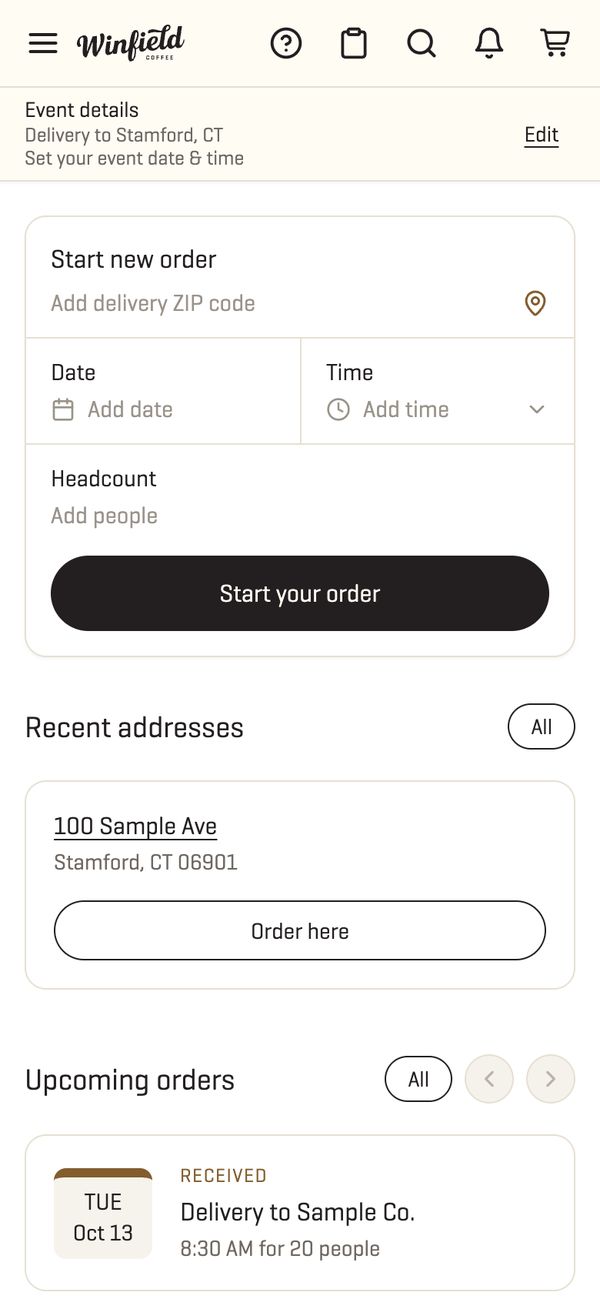
That is also what makes the next order easy. The buyer opens her account on Monday morning, picks the lunch she ordered three weeks ago and changes the date to Friday. Items, headcount, delivery address and payment method are already there. One tap, done.
How to set it up on your own catering site
Four changes to the catering ordering page do most of the work. We see the same four pieces missing when we audit other restaurants' catering sites.
One, a company field at checkout. Not a line in the notes box. A real field for the company name, with the billing email and the delivery address that go with it, and a flag that says “pay by invoice” or “pay by card”. When pay by invoice is chosen, the checkout opens a PO number field and a line for the approver’s email.
Two, a tax-exempt certificate on the account. The buyer uploads a PDF once. The site stores the states the certificate is valid in. On an order delivered to one of those states, the sales tax is removed and the invoice shows the certificate number. If the order is delivered to a state that is not on the certificate, the tax stays and the buyer sees why.
Three, an approval step before the kitchen starts. The buyer submits the order. The site holds it, emails the approver and waits. The approver clicks approve or decline on his phone. On approve, the kitchen gets the ticket. On decline, the buyer gets a note. No order is cooked on the first click.
Four, saved past orders. Every order lives on the account. A past order can become the next one in two taps: same items, same headcount, new date. The site also saves a short name for the order so the office manager can call it “Monday team lunch” instead of order 10842.
What the kitchen and the catering manager see
The dashboard on your side shows the corporate order next to the direct one, with the pieces the kitchen needs for both. On a corporate order, the ticket shows the company name, the PO number, the delivery window, the headcount, utensils, allergy notes and the approver who signed off, so the person boxing the order never has to open a second screen. The invoice is created from the same ticket and emailed with the PO number on it when the event is over.
The catering manager also gets a view of the whole company, not just one order. She sees that one office ordered six times in the last two months, that the second office of the same company has not ordered yet, and that one buyer has placed four orders of the same tray on four Fridays. That is where the second order comes from, and it is already an easy email. A note to a customer she already serves, not a cold pitch.
Why this is worth the extra work
Corporate accounts are the slow money of catering. A pickup customer orders once and comes back when she is hungry. An office orders every Friday for 40 people, year after year, with the same approver and the same card. One corporate account that reorders twice a month can be worth more than many one-off orders over a year.
The way to win those accounts is to make the first order easy and the second order even easier. The restaurants we see winning them do three things on their own catering site: they ask for the four fields above at checkout, they let the buyer save the order with a name, and they put a reorder button where a reorder actually fits, on the home of the account.
Our catering ordering system was built for this: company name, PO number, tax-exempt certificate, approver and one-click reorder on the account. On the Winfield Street Coffee catering site, every order placed by a buyer sits in her own account, including the ones she first placed as a guest, so the office manager who ordered a tray on a Monday can book the same tray for the next Monday without a phone call. For the full flow of a catering order from the first inquiry to delivery, see our guide to taking catering orders online.
Frequently asked questions
Can we accept corporate purchase orders on our online ordering site?
Yes. The checkout carries a PO number field and the invoice ships with that number on it. The kitchen does not start until the payment or PO is approved.
How do we handle tax-exempt customers?
They upload the certificate once to their account. The site then removes sales tax from their orders in the states where the certificate is valid, and the invoice shows the certificate number.
Can one company have more than one person placing orders?
Yes. A corporate account can hold several buyers under one billing address, with a shared payment method and shared order history.
What happens when the buyer wants the same order again next week?
She opens her account, picks the past order and changes the date. Items, headcount, delivery address and payment are already there.

Comments