How to get ezCater orders into Clover (and your other POS)
ezCater orders should land in your POS with the right items, tax and reports. Here is how the handoff works, and the three ways restaurants do it.

Key takeaways
- ezCater sends new orders through a connection your system has to listen for. Without that listener, every order is retyped into the POS.
- A direct link can accept the order in one click, open an atomic order in Clover with the right items and tax, and keep the sale in your reports.
- Three paths exist today, with different costs and failure modes: type by hand, use a middleware service, or run a system your team owns.
- Access to the ezCater API goes through their implementations process. Ask ezCater and your POS provider whether a direct link exists for your account.
A real ezCater order carries the delivery window, the headcount, utensils and allergy notes. If the only way into your register is a line cook retyping it, something always slips: a tray count, the sales tax of the store that actually makes it, or the whole sale when the manager forgets to ring it in.
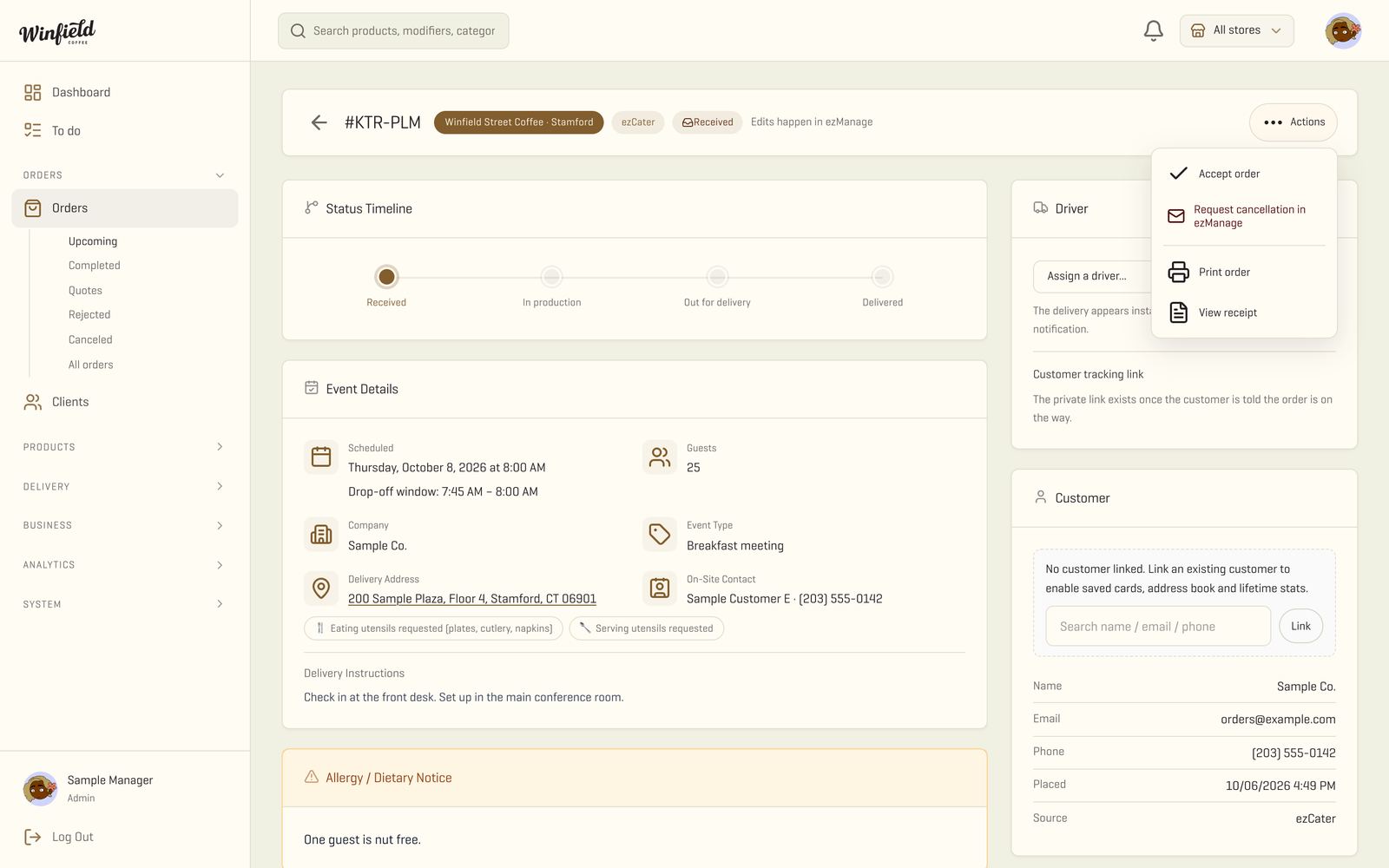
The clean fix is a direct link between ezCater and your register. The order shows up on your dashboard the second the customer places it, the manager accepts it in one click, a line is opened in the Clover of the store that will prepare it, and the delivery status goes back to ezCater as the driver moves. This post explains how that link actually works, and the three ways restaurants do it today.
Our catering ordering system is built around this flow, and we work with ezCater’s API in a working setup for Winfield Street Coffee. The details below come from the ezCater documentation we open every week and from building the connection ourselves.
How does an ezCater order reach your POS?
An ezCater order reaches your register in three steps: a notification when the customer submits the order, a lookup for the full order, and an accept or reject from your side.
The connection runs over webhooks, which are small calls ezCater makes to your server whenever something happens. The ezCater overview page puts it plainly: “The API utilizes webhooks to allow you to pull information on order events and store menus.” Your system has to be awake to receive that call. ezCater does not resend a notification if nobody answered.
Once the “order submitted” event lands, your system fetches the full order, including the delivery address, the headcount and the items, by “querying for order details (using the existing orderById query) based on the entity_id returned by the order submitted event,” per the Orders API page. The manager sees the order on the dashboard and clicks accept. That click translates into a call to “either the acceptOrder or rejectOrder mutations with the order id to accept or reject it, based on the order data or whatever other criteria you have,” again per the Orders API page.
Two details catch most teams the first time. The connection needs ezCater approval: the username and token for the API are handled “throughout the Implementations process,” per the API overview. You cannot sign up on your own, and you cannot flip it on from the portal. And the listener has to be in place before any status update: the Delivery API prerequisites page is explicit that “before using the Delivery API, you must implement a listener for new order events,” and “it does not provide notifications for new orders.”
How does the order open in Clover?
Once your system has the full order, it opens one record in the Clover of the store that will prepare it. In Clover terms this is an atomic order, which the Clover docs describe as a way to “make a single API call to build an order cart and then complete the order.” That call “can also include non-Clover inventory items and ad hoc items,” which matters because an item on your ezCater menu might not match a SKU in Clover line for line. The missing item goes in as a named line with the right price, and the kitchen prints a ticket that reads like any other.
The atomic order also handles the money side: Clover ensures “accurate totals and tax calculations in one seamless process.” That is the piece that decides whether the sale shows up in your reports or dies in a spreadsheet. “Merchants can view the order on the Merchant Dashboard and devices” after it is created, so the manager sees it next to the dine-in and takeout tickets of the day.
The practical rule we use: the order is created in the register of the store that produces it, not the store that happens to own the ezCater listing. In our setup, an ezCater listing fulfilled by a different store used to never reach the POS and used to drop out of reports. Today the order is born with the store that fulfills it, and the sale and the local tax land in the right place.
How do your own drivers talk back to ezCater?
If you run your own fleet, ezCater expects you to tell it when the driver has picked up, is on the way, and has arrived. The Delivery API page says the connection “empowers restaurants that manage and augment their own in-house deliveries to send delivery event updates directly from their systems.” The updates travel back to ezCater “as it changes throughout its lifecycle,” so the customer sees the same status your dashboard shows.
In practice, your driver app pushes two events: departed with the order, delivered. Each push updates ezCater on one side and your dashboard on the other. A photo of the car loaded and a signed proof of delivery stay in your records for the week the customer calls about a missing tray.
The three ways restaurants do this today
Not every restaurant needs to build the connection. The job is the same. The way to get there is not.
| Path | How it works | Where it breaks |
|---|---|---|
| Type by hand | A manager watches the ezCater portal and rings each order into Clover | Fine for a handful of orders a week. Errors in item, tray count and tax grow fast once the volume moves. |
| Middleware service | A paid service sits between ezCater and your register, usually billed per store | Depends on whether that service supports your POS and whether the ezCater menu matches the register menu. Items published only on ezCater are a common break. |
| System your team owns | Your dashboard holds the Orders API and the Delivery API connections and opens the atomic order in Clover | Needs ezCater approval, a listener that stays up, and a plan for items that only exist on one side. |
The practical question is not which path is cleanest on paper. It is which one your team can run on a Friday with a stack of catering drops. Ask ezCater and your POS provider whether a direct connection exists for your setup, and ask any middleware vendor to show the connection working with your POS and your menus before you sign.
A note on where the accept happens
A specific ezCater guide, dated 2026-08-12, says “all ezCater orders, integrated or not, must be accepted in Partner Portal before anything else happens.” Read that one in context. The guide refers to a specific integrated setup with a known ordering platform. The Orders API, as of today, documents the accept call as a mutation your system makes with the order id. That is a different path. Before you decide where the accept happens for your restaurant, ask ezCater which path your account is on. The answer sometimes depends on the ordering platform the account was originally wired to.
What we see most often
The teams that save the most time with this connection are the ones that already took catering orders seriously: a menu with lead times, a store that owns each sale, and a line cook who sees the ticket in Clover like any other. The teams that put the connection in before that work is done end up with the same catering mess, now with more plumbing.
If you want a second pair of eyes on where catering is leaking in your operation, we offer a short free assessment that reads your current flow and tells you what the direct link would and would not fix. For the first mile of catering, before any connection is in the picture, our guide on how to take catering orders online covers the inquiry step and the deposit.
Frequently asked questions
Do I need ezCater's approval to connect my own system?
Yes. Access to the ezCater API uses a username and token that are set up through their implementations process. You cannot sign up on your own.
What happens to an item that is on my ezCater menu but is not in Clover?
Clover accepts non-Clover inventory items and ad hoc items when the order is created, so a line can be added with the right name and price. Keep the two menus close so the kitchen does not stop at the counter.
Do I accept an ezCater order twice, once in ezCater and once in my dashboard?
No. In a direct connection the accept happens once. Your system calls the acceptOrder mutation and the ezCater side marks the order as accepted.
Can my own drivers' status show up in ezCater?
Yes. The Delivery API lets you send driver and delivery updates back to ezCater as the order moves. The listener for new orders has to be in place before you start sending status.
What if one store makes the order of another store's ezCater listing?
Decide first who owns the sale. In our setup, the order is created in the Clover of the store that fulfills it, so the sale and the local tax land in the right report.
Sources
- ezCater, Orders API · Oct 16, 2026
- ezCater, Delivery API · Oct 16, 2026
- ezCater, Delivery API Prerequisites · Oct 15, 2026
- ezCater, API Overview · Oct 15, 2026
- ezCater, Order Acceptance and Transmission · Aug 12, 2026
- Clover, Create an atomic order · Jun 17, 2026


Comments