How to take catering orders online without losing the big ones
When an order gets big, the online cart often stops and an email takes over. Here is how to take catering orders online, from event date to delivery.

Key takeaways
- When an order gets big, many restaurant sites stop taking it online and switch to email or a form.
- A catering order needs an event date, a drop-off window, a headcount and trays with required options, paid at checkout.
- Approve every order in one dashboard and send it to the kitchen shortly before the event.
- Keep marketplaces for new customers, and bring your regulars, who place most catering orders, to your own site.
To take catering orders online, give catering its own ordering flow. The customer picks an event date and a drop-off window, enters the headcount, chooses trays with their required options and pays at checkout. Your team approves the order in one dashboard, and the kitchen gets it in time for the event.
On many of the restaurant sites we review, that flow doesn’t exist yet.
Why do big catering orders still arrive by email?
Because online ordering was built for takeout first. Takeout is simple: a few items, one pickup time, paid and done. Catering asks more questions, and a regular cart has nowhere to ask them.
One owner put it plainly in a Square seller forum in February 2026: “Typically, catering requires a different set of parameters than our online ordering site such as lead times, pickup/delivery availability, fees & gratuities, etc., making our current online ordering site unusable for Catering orders.” Another owner in the same thread said customers who want catering delivered “have to either email or call us to place the order.”
We see the same pattern when we review restaurant and cafe sites. On many of them, the online cart takes an order up to 20 or 25 people. Above that, the page says “email us” or “fill out this form.” The bigger the order, the more manual it gets. And the biggest order is the one you can least afford to lose.
Here is what a manual catering order costs you, even when it goes well:
- Someone retypes it into the POS, and mistakes come in with the retyping.
- The card is taken on a callback, so the order isn’t confirmed until someone picks up the phone.
- The details live in one person’s inbox. If that person is off, nobody knows the order exists.
- The allergy note travels by forwarded email and reaches the kitchen late, or not at all.
What does a catering order need that a takeout order doesn’t?
A catering order needs an event, not a pickup time. This is the difference, field by field.
| Takeout order | Catering order | |
|---|---|---|
| When | As soon as possible, or a pickup time | Event date and a drop-off window |
| How many | A few items | A headcount, and how many people each tray serves |
| Options | Optional add-ons | Required choices per tray, like bread or protein |
| Price | Per item | Per tray, with the price per person next to it |
| Notice | Minutes | A lead time per location and per item |
| Extras | Napkins | Utensils, setup, an on-site contact, allergy notes |
| Paperwork | A receipt | Receipt or invoice, PO number, sales tax for the right store |
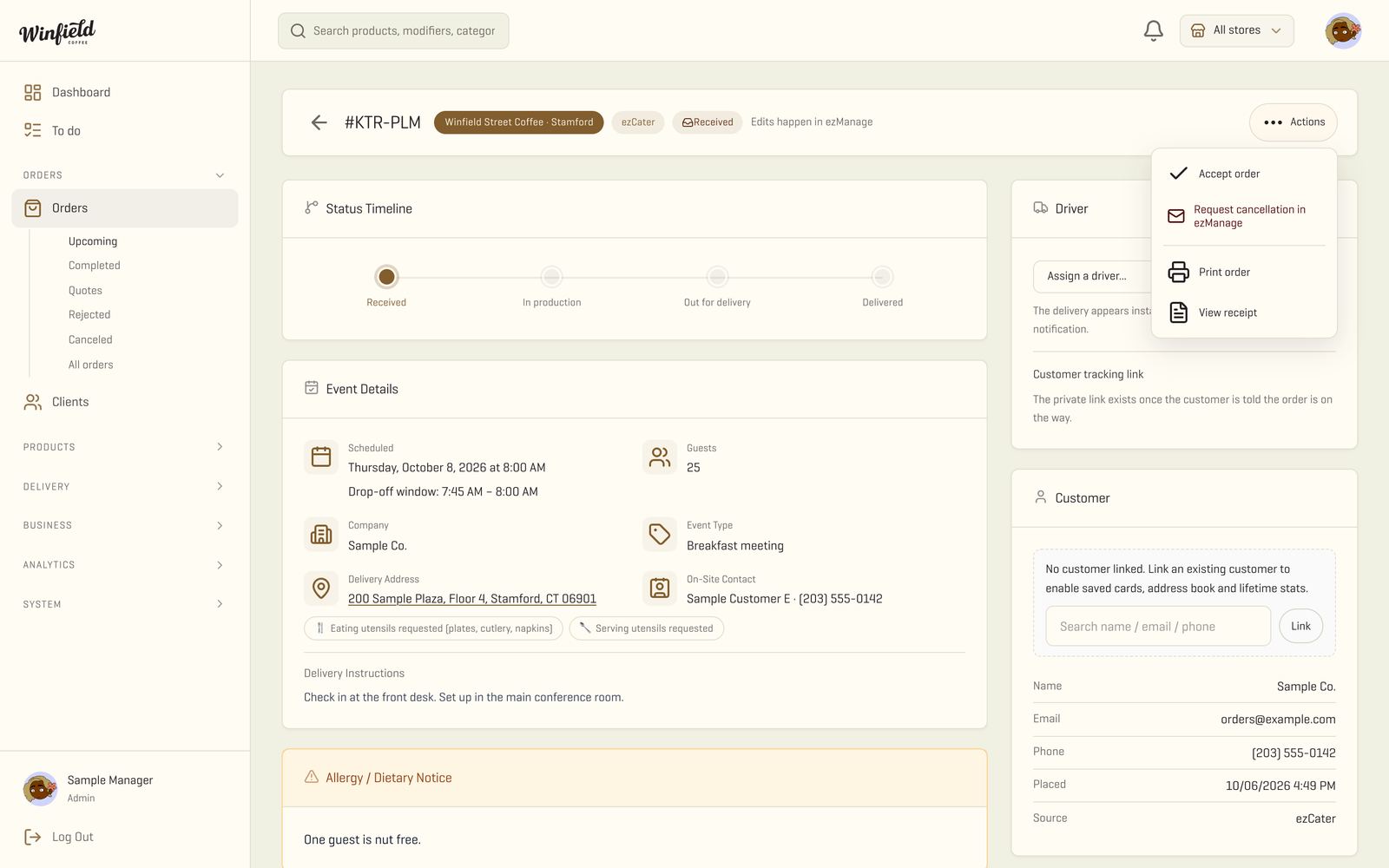
When all of this lives on one screen, nobody has to dig through an email thread the morning of the event.
How do you take catering orders online, step by step?
- Give catering its own menu. Sell trays and boxes, and show “serves 12” and the price per person on each one. Whoever orders for an office usually has a budget per head, so do that math for them.
- Ask for the event before the cart. Date, drop-off window, headcount, delivery or pickup. With that, the site can hide the times you can’t make and suggest how many trays the group needs.
- Make required choices required. If a sandwich tray needs a bread choice, the order can’t go through without one. That’s one less phone call the day before.
- Take the card at checkout. Not on a callback. When the payment runs through your own POS, such as Clover, Square or Toast, the catering sale shows up in the same reports as the counter. For companies that pay by invoice, keep the PO number on the order.
- Approve before the kitchen starts. A manager accepts the order, or asks the customer for a change, in one dashboard. The kitchen gets the ticket shortly before the event, not the minute the order was placed.
- Send it to the right store. If you have more than one location, the order goes to the store that serves that address, with that store’s sales tax.
- Close the loop on delivery. The driver checks every item before leaving and closes the drop-off with a photo. The customer gets a tracking link, so “where’s my order?” gets answered before anyone calls. More on that in our page about a driver app with live tracking.
Should you keep taking catering orders on marketplaces?
Yes, for new customers. Marketplaces put you in front of office buyers who have never heard of you. In ezCater’s own research, 96% of workplace orderers placed an order with a restaurant that was new to them in 2025.
Repeat business is where your own site pays off. A 2026 report from Monkey, a catering software company, found that 60% of catering orders come from just 5% of customers, and that marketplace orders average 6% to 8% less than orders placed directly with the restaurant. The regulars who drive most of your catering are the ones worth bringing to your own site. Diners lean that way too: 56% of delivery customers say they’d rather order directly through the restaurant, according to the National Restaurant Association’s 2026 State of the Restaurant Industry report.
Two things make that work:
- One dashboard for both channels. Marketplace orders and direct orders land in the same place, with the same approval step, so none of them miss the POS or the reports. We work with ezCater’s API, so in the systems we build, ezCater orders sit next to direct ones and the delivery status goes back to ezCater on its own.
- An easy way back. A repeat customer can order again from your site in one click, with the last order and the delivery address already saved.
What are your options, and what does each one cost you?
There are four common ways to take catering orders. None is right for everyone.
| Option | What it costs you | Fits when |
|---|---|---|
| Email and a PDF menu | Staff time, retyping, orders with no clear owner | A few catering orders a month |
| A form on your website | Still retyped, usually no payment and no link to the POS | You want structure before you invest |
| The catering add-on of your POS or ordering platform | A monthly fee, a per-order fee, or both, and limits on lead times, headcount and tax per store | Simple catering at one location |
| A system built around your operation, that you own | A build period and one monthly price, with no per-order fees | Catering is a real share of sales, or you run more than one store |
Our take: if catering is a side line, a clear form and a fast reply can be enough. Once big orders are a real part of your sales, they deserve the same checkout your takeout already has. That’s the point to look at a catering ordering system built for how your kitchen works.
A quick check before the holiday rush
The holidays bring office parties and family pre-orders, and that’s when a manual process gets tested. A holiday order form that ends with “we’ll call you to take the card” is one of the most common gaps we find. Run this check on your own site:
- Can a customer order for 40 people without emailing you?
- Does the site block dates and times your kitchen can’t make?
- Is the card charged at checkout, not on a callback?
- Does every catering sale show up in your POS reports?
- Does the kitchen get allergy notes with the order?
- Does the customer get a tracking link on the day?
If you answered no to two or more, start with the step that removes the most retyping: taking payment at checkout, inside your POS.
We built this whole flow for Winfield Street Coffee, a coffee chain with several locations: their own catering ordering site, card payments into each store’s register, one dashboard for direct and ezCater orders, and a driver app with their name on it. You can see every piece of that system, with real screens.
Frequently asked questions
Can I take catering orders online without changing my POS?
Yes. A catering ordering site can send paid orders to the POS you already run, such as Clover, Square or Toast, so sales and tax match your reports.
How much notice should I require for catering orders?
It depends on your kitchen. Set the lead time per location and per item, so a coffee box can be ordered the day before while a hot lunch for 50 needs more notice, and let the site block anything inside that window.
Should I stop selling catering on marketplaces like ezCater?
No. Keep them for new customers, and give repeat customers a simple way to order again from your own site.
How long does it take to get a catering ordering site live?
Ours go live in up to 30 days, already taking orders, starting with one store.
Do I need an app to take catering orders?
No. A fast ordering site works on a phone and on a laptop. An app can come later, for customers who order every week.
Sources
- Square Seller Community, owner thread on taking catering orders · Feb 4, 2026
- ezCater LunchRush, How restaurants can get in on the business catering boom · May 5, 2026
- Food On Demand, Catering Outpaces Restaurant Industry Growth (Monkey 2026 State of Catering report) · Jul 15, 2026
- National Restaurant Association, 2026 State of the Restaurant Industry · Feb 12, 2026

Comments